

 Last updated Jul 17, 2026


Katelynn Sobus / Cats.com
Pet cameras can provide peace of mind when you’re not home. Whether you’re at work or on a week-long trip, a camera lets you check in on your cat anytime you want. It’s a game-changer for anxious cat parents!
That said, not all pet cameras are made equal. Aside from the obvious differences in video and sound quality, some of them require pricey subscriptions to access basic features. We’re also seeing a lot more AI integration into pet cameras these days, which can sometimes be useful–and sometimes means paying a hefty price tag for features that don’t work as advertised.
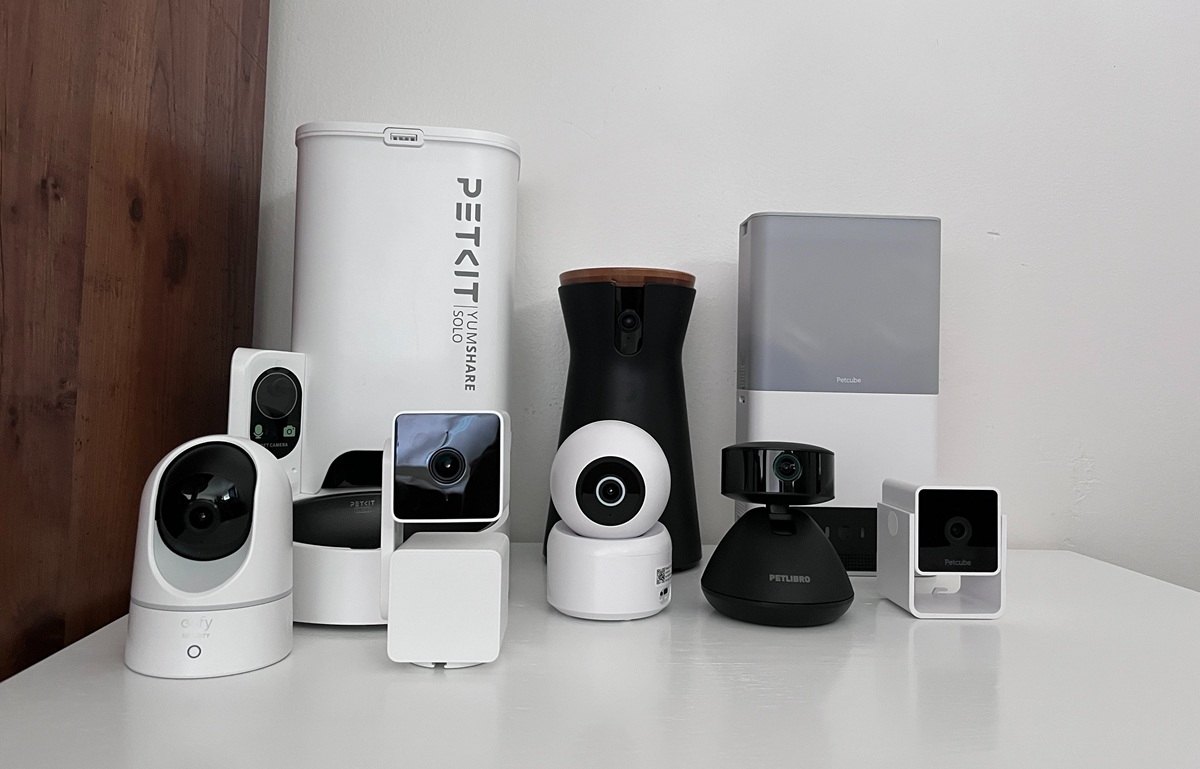
For this article, I tested eight different pet cameras to get a good feel for how they worked, what features were worth the price, and which weren’t worth paying for. Below are my honest reviews.
At a Glance: Our Top Picks for Best Pet Cameras for Cats


We highly recommend looking at the comparison table we have below where we highlighted the features of each product. You’ll also find more detailed information about each product later in the article.


Wyze Cam Pan v3 Pan and Tilt Pet Camera
- Camera tilts 360° and pans 180°, with excellent motion and sound tracking
- A high-quality camera at an affordable price
- Instant and reliable notifications


Eufy Indoor Security Cam E220
- Motion-tracking features capture almost every movement
- A quality, yet affordable pet camera
- Compatible with an SD card for easy storage


PATPET WIFI Monitoring Auto Focus Camera
- See frequent snapshots of your pet’s day via photos (without a subscription) or videos (with a subscription)
- 360° panning with pet and human motion tracking
- Quality footage with nighttime vision


Petlibro Scout Smart Pet Camera
- 1080p HD video with night vision
- 360° pan and tilt covers the entire room
- Two-way audio and sound effects designed for cats


Furbo 360 Cat Camera
- Frequent recordings, so you won’t miss any part of your cat’s day or night
- Wide range of pet-specific notifications and settings
- Cat-friendly features


Petcube Cam HD Monitoring Pet Camera
- 1080p HD video with a wide-angle view
- Instant, customizable notifications and alerts
- Petcube’s subscription service offers frequent recordings so that you don’t miss a second of your cat’s day

Petcube Bites 2 Lite Treat-Dispensing Camera
- 1080p HD video with a wide angle lens
- Petcube’s subscription service offers frequent recordings so that you don’t miss a second of your cat’s day
- Large treat hopper that works with various sizes of treats


PETKIT Yumshare Solo With Camera
- Automatic feeders provide the routine your cat needs, without them waking you up yelling for breakfast!
- Watch your cat eat each meal and view the bowl at any time
- Phone app is easy to use with highly customizable settings
Why Trust Cats.com
We strive to provide accurate, up-to-date reviews on all cat products, and especially with pet cameras as technology is constantly changing. This article has been updated several times since our original review in 2018.
Choosing products involved extensive research, and we then spent months testing the cameras in our own homes. My own notes included camera quality, my experience using each app, and the frequency and accuracy of notifications. I also tested any AI functionality each camera had, observing whether it could correctly identify cats or behaviors.
Although we’ve been sent cameras from Petcube in the past, I purchased and tested each product in today’s article myself.
Top 8 Pet Cameras For Cats
It’s impossible to choose one pet camera that will suit all households. We love the Wyze Cam Pan v3 for its affordability, quality footage, and excellent motion and sound tracking abilities, but you may prefer a camera made more specifically for cats, or one with extra features such as treat dispensing.
Each cat parent has different preferences, which is why we’ve broken our recommendations into a range of categories below.
#1 Overall Best: Wyze Cam Pan v3 Pan and Tilt Pet Camera
What stands out to me most about the Wyze Cam Pan v3 is its motion and sound detection, which is highly sensitive and works great. It tracked every little movement, to the point where my family joked that they had a little robot watching them during the testing period! My only complaint was that it seemed to prioritize tracking people over pets, but I still had plenty of footage of my cats to look over at the end of each day.

Katelynn Sobus / Cats.com

Katelynn Sobus / Cats.com

Pet cameras offer many valuable features like nigh vision mode, sound and motion alerts, and alarms. Katelynn Sobus / Cats.com
I was also impressed with its affordability compared to the features offered. These include reliable motion detection, two-way audio, and quality nighttime footage.
In a previous version of this article, we tested an older Wyze pet camera model and found that the audio was a bit muffled. Unfortunately, this remains true for the Cam Pan v3, but I could still clearly understand most words spoken during recording. For cat-watching purposes, it should do okay.
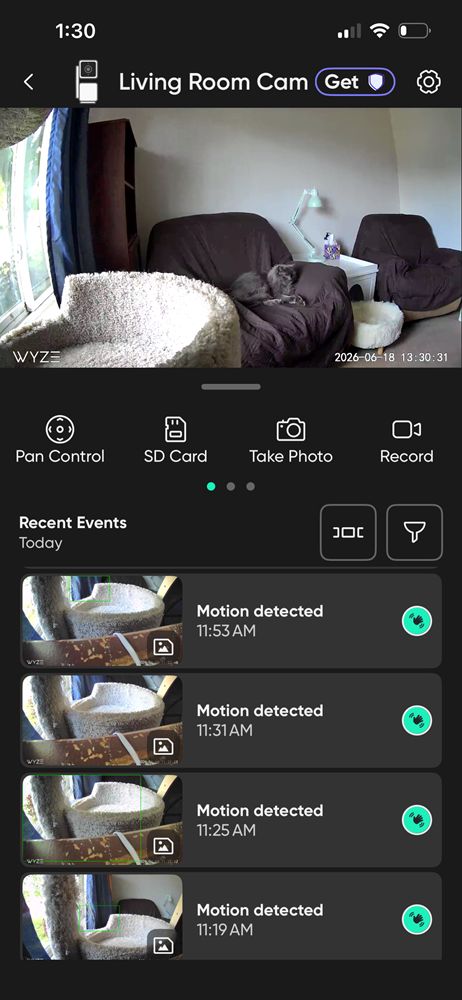
The camera works without a subscription, but features like smart alerts, automatic recordings, and facial recognition require a paid plan. Without a subscription, you’ll still receive motion-detected photos. Katelynn Sobus / Cats.com
The camera doesn’t require a subscription to function, though you will miss out on some key features, such as smart alerts, automatic recordings, and facial recognition. You’ll still be able to see photos each time motion is detected.
Wyze’s plans are cheaper than most pet camera subscriptions, with the basic plan costing just $2.99/month, but it’s still disappointing to have to pay monthly to unlock all of the features on a product you’ve already purchased.
Without a subscription, the app offers rolling cloud storage of footage for up to two weeks, or you can purchase an SD card separately to store video and photos yourself.
Overall, I was blown away with the camera’s performance and would recommend it to most cat parents. The only exception is if you’re looking for more cat-specific features, such as a laser pointer or treat dispensing.
What We Liked:
- Quality product at an affordable price
- Excellent motion and sound detection
- Functions with or without a subscription (though some features are locked behind subscription fees)
- Instant and reliable notifications
- Compatible with an SD card for local storage
What We Didn’t Like:
- Poor audio quality
- Some features are locked behind monthly subscription fees
#2 Runner Up: Eufy Indoor Security Cam E220
The Eufy security cam is another one that impressed me with its tracking abilities. It not only picked up motion within the room, but in the hallway situated to the side of the camera’s usual angle. As great as it was at tracking human movement, however, it picked up less cat activity than the Wyze Cam Pan. It typically picked up cat activity when there were also humans in the room, and ignored them otherwise. That’s the only reason it sits lower on today’s list.

Katelynn Sobus / Cats.com

Katelynn Sobus / Cats.com

Katelynn Sobus / Cats.com
Otherwise, I liked everything about this one. Set-up was quick and easy, the in-app settings are incredibly customizable, and you can use your own SD card for storage.
One feature that stood out to me was the ability to set a pre-recorded pet command, such as telling your cat to “stop” when they enter the frame. This could work to keep them off counters or away from your houseplants when you’re not home, though there’s no guarantee that they won’t ignore the command–they are a cat, after all!
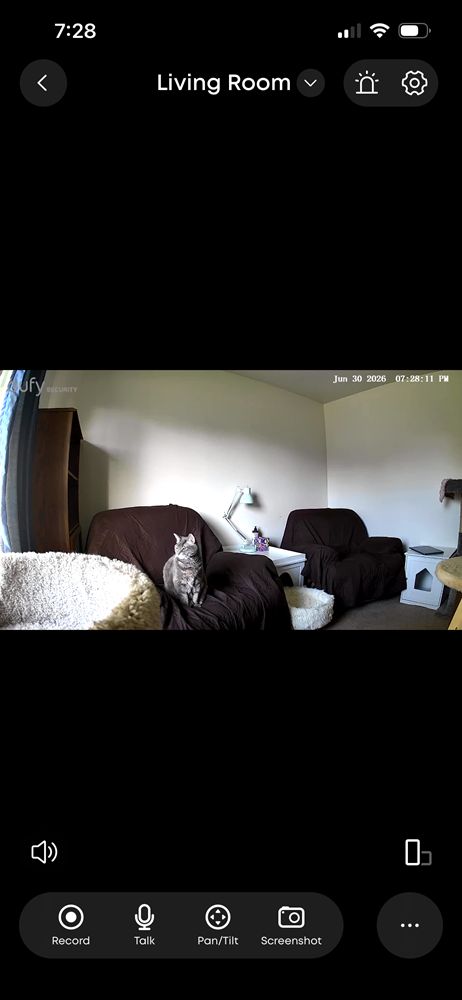
A standout feature is the ability to play a prerecorded voice command when your cat enters the frame, though whether they listen is another matter. Katelynn Sobus / Cats.com
I also like the ability to continuously record (if you have an SD card inserted) and the playback feature that comes with the subscription service, which shows recordings dating back 30 or 90 days depending on your payment tier.
What We Liked:
- Excellent human detection and motion tracking features that capture almost every movement
- Functions with or without a subscription (though some features are locked behind subscription fees)
- Compatible with an SD card for easy storage
- A great balance between quality and affordability
What We Didn’t Like:
- Pet detection doesn’t work as well as human detection
#3 Budget Pick: PATPET WIFI Monitoring Auto Focus Camera
I liked the PATPET for its 360° panning, pet and human motion tracking abilities, and the two-way communication system that allows you to hear and talk to your pets. I also liked the customizable settings and threat analysis features, though I didn’t find the app very intuitive to use.

Katelynn Sobus / Cats.com

Katelynn Sobus / Cats.com

Katelynn Sobus / Cats.com
Without a subscription, you can view frequent photos of your cat’s day to get an idea of what they’ve been up to, as well as viewing the live stream whenever you’d like. You can also manually record and take photos in the app. With a subscription, you’ll also have access to automated recordings, smart alerts, and a search feature that allows you to more easily find specific videos.
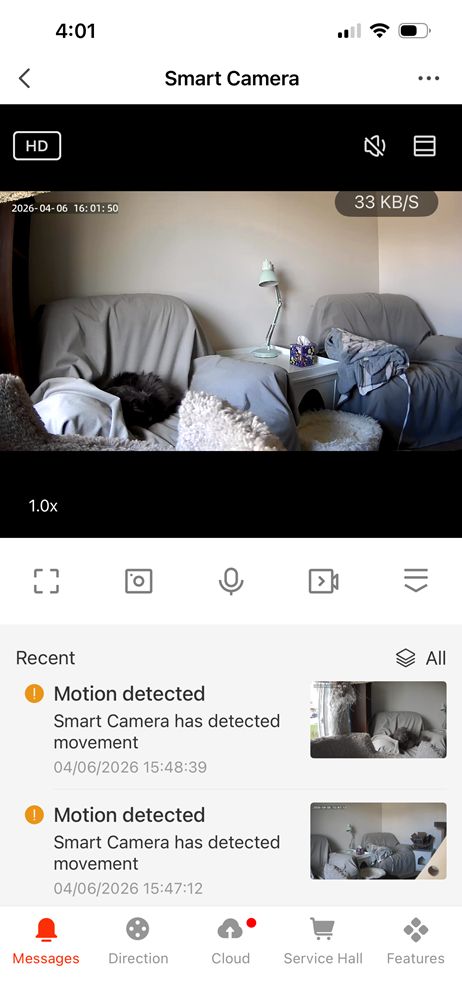
Without a subscription, you can view the live stream, motion-detected photos, and manually capture photos or videos. A subscription adds automatic recordings, smart alerts, and video search. Katelynn Sobus / Cats.com
Overall, I found this one to be a good option for the price, and I really love that the subscription service isn’t strictly necessary for accessing the camera and seeing what your cat has been up to throughout the day.
What We Liked:
- View frequent snapshots of your cat’s day, even without a subscription service
- Quality footage with nighttime vision
- 360° panning with pet and human motion tracking
- Two-way communication allows you to hear and talk to your cat
What We Didn’t Like:
- App isn’t very intuitive to use
#4 Made for Cats: Petlibro Scout Smart Pet Camera
The Petlibro Scout smart pet camera stands out amongst competitors for its cat-friendly features, including smart tracking, multi-pet recognition, and the ability to play chirping bird sounds to capture your cat’s attention quickly.

Katelynn Sobus / Cats.com

Katelynn Sobus / Cats.com

Katelynn Sobus / Cats.com
It tracked my cats well, capturing photos and video when it detected movement. You can add up to five pets in the app, and the footage will be automatically labelled with each of their names.
While the Petlibro Video Cloud subscription service is optional, it’s rather pricey (starting at $11.99/month). With this subscription, you get daily AI-generated summaries of your pets’ day and activity tracking, which lets you know when your cat is eating, drinking, using the litter box, or wandering up to the camera for a curious “selfie.”
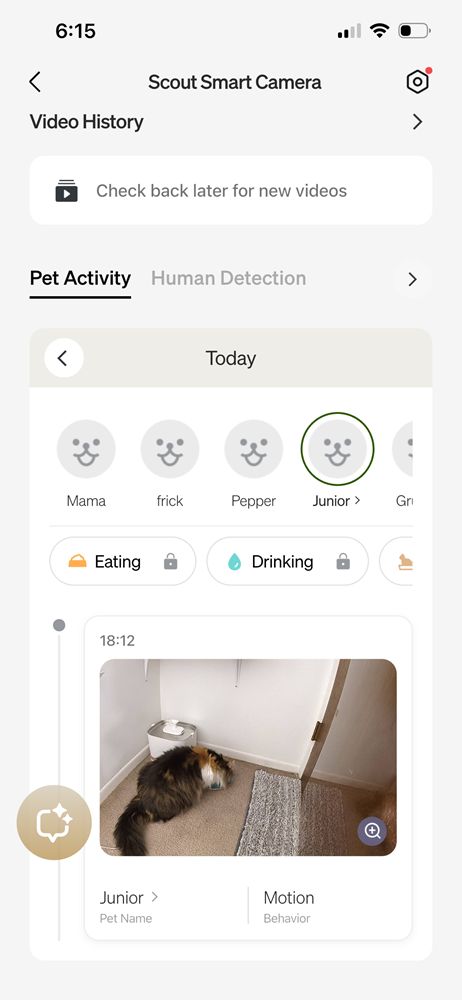
The camera reliably tracked my cats, automatically capturing and labeling photos and videos for up to five pets. Katelynn Sobus / Cats.com
While the camera’s AI features are unique and fun, they aren’t without some major flaws. It confused my cats for one another often, even those who look nothing alike. Unlike other cameras on our list that capture each movement, the Petlibro Scout camera captured moments seemingly at random.
Overall, I enjoyed this camera for its basic features and found it fun to check in on my cats each day. While it sits at a good price point for a camera with multi-pet recognition, this technology doesn’t work as well as it could. If you’re willing to forego these features, you can find more consistent recordings, and better pet and home surveillance, for nearly half the price.
What We Liked:
- 1080p HD video with night vision for clear viewing day or night
- 360° pan and tilt covers the entire room
- Pet auto-tracking and recognition
- Two-way audio and sound effects designed for cats
- Fast setup and intuitive app with optional advanced features
What We Didn’t Like:
- Activity tracking and daily summaries require a paid subscription
- AI may confuse similar-looking cats or misidentify behaviors
- Occasionally mistakes furry objects or cat images for real pets
#5 Cat-Friendly Features: Furbo 360 Cat Camera
The Furbo 360 cat camera has some great features, like the ability to talk to your pets, feed them treats, and even play a variety of sounds to either calm them down or get their attention.

Katelynn Sobus / Cats.com

Katelynn Sobus / Cats.com

Katelynn Sobus / Cats.com
It has decent camera quality (though it’s grainier than most on our list) and good audio. Recordings are frequent, so you’re not going to miss a moment of your cat’s day, and the camera has good night vision as well.
When it comes to cat identification, the Furbo was fairly accurate, with its only mix-ups being cats of similar colors. More often than not, however, it didn’t identify a cat at all, simply saying “your cat” despite them each having a profile in the app.
When the cats were identified, their name could be seen in the notifications and occasionally in the AI chat log, but strangely didn’t show up in the video tab itself. There is also no option to filter the videos by pet.
Actions were less reliably identified, and changed so frequently (despite the cats being in the same place) that it felt like random guesses were being thrown out. For instance, the AI correctly guessed that my cat was lying in a chair, but in other notifications identified the same chair as a pet bed, a blanket, and a beanbag.
Another thing I personally disliked about the app was that Furbo’s “Nanny chat,” an AI chatbot, takes up more of the homepage than the live stream itself, and you have to go to another tab to actually see the videos that have been recorded.
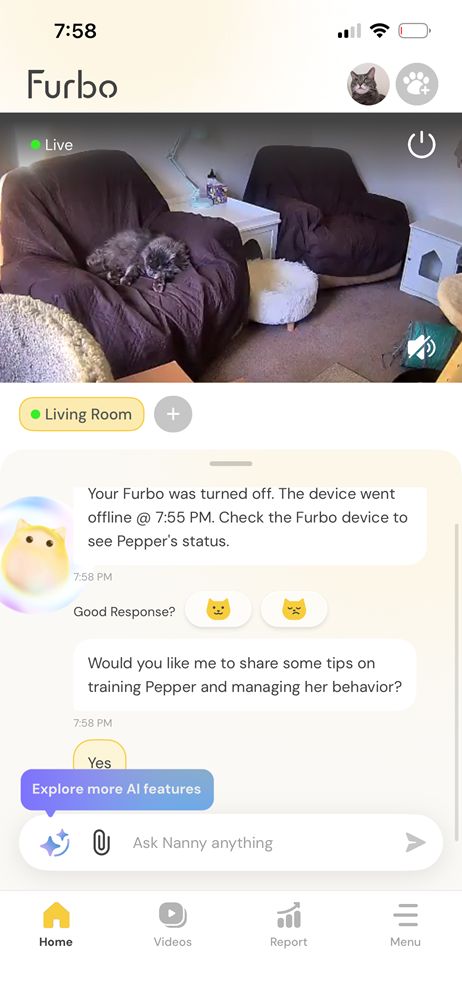
Once the cats were identified, their names appeared in notifications and occasionally in the AI chat log. However, their names did not appear in the video tab, and there was no option to filter videos by individual pet. Katelynn Sobus / Cats.com
The camera’s last and largest flaw is that it doesn’t work without a subscription service, which is an understandable dealbreaker for some cat parents. Currently, Furbo’s standard plan costs $6.49/month and the premium plan costs $8.12/month.
What We Liked:
- Good nighttime vision and frequent recordings, so that you don’t miss any part of your cat’s day or night
- Choose from a wide range of notifications for pet emergencies, home security, and abnormal behaviors, as well as everyday activity
- Play a range of sounds for your cat, from music to calm them down to a crinkling bag to get their attention before dispensing treats
- Treat dispenser works with a variety of treat sizes
What We Didn’t Like:
- Camera doesn’t function without a subscription
- Poor video quality compared to other, more affordable cameras tested
- AI features are often inaccurate or simply not applied at all (in the case of identifying cats)
#6 Crowd Favorite: Petcube Cam HD Monitoring Pet Camera
If you’re looking for a cheap camera with basic features, the Petcube Cam HD is a good choice. It has 1080p HD video quality and great nighttime vision. The camera can be manually adjusted to point up or down and has a wide field of view, but there are no in-app controls and it doesn’t pan around the room.

Katelynn Sobus / Cats.com

Katelynn Sobus / Cats.com

Mallory Crusta / Cats.com
With a subscription, you’ll get instant, customizable notifications and a look into almost every moment of your cat’s day. You’ll also get “daily diaries,” which offer a short video and an AI summary of your cat’s day. As with most AI technology, these are only somewhat accurate.
Without a subscription, you’ll be able to access the camera’s livestream, as well as take photos and record video manually.
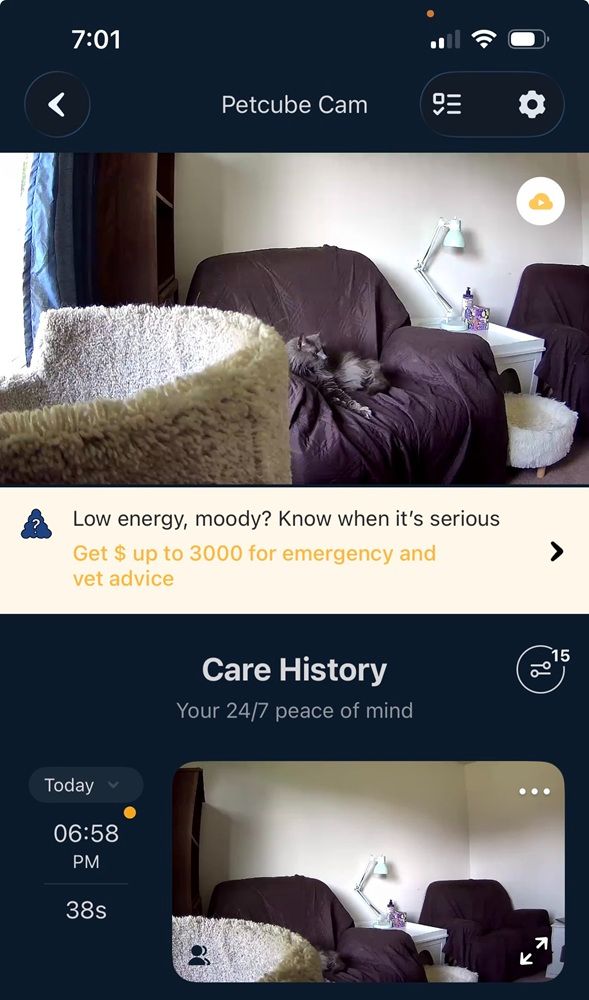
The app has some drawbacks, but the camera consistently delivered clear, reliable footage without focus issues. Katelynn Sobus / Cats.com
The camera and Petcube app does have its flaws, including ads for Petcube’s pet insurance that cannot be removed from the app and an added charge for emergency alerts, which are only available at the highest subscription tier. Thankfully, the camera didn’t go out of focus for me like Petcube’s Bites 2 Lite. All of the footage was clear and in-focus, with no blackouts.
Overall, you can get a few extra features if you’re willing to spend a bit more on your pet camera, but if you only want the basics, this is a solid recommendation! Just keep the monthly subscription price in mind if you’d like recordings and smart notifications.
What We Liked:
- 1080p HD video with a wide-angle view
- Basic features at a good price
- Instant, customizable notifications and frequent recordings that you can view back later (with a Petcube subscription)
What We Didn’t Like:
- Added charge for emergency alerts, which can only be accessed with the most expensive subscription tier
- App features several non-removable ads for the company’s pet insurance
- Features are limited without a Petcube subscription
#7 Best Treat Cam: Petcube Bites 2 Lite Treat-Dispensing Camera
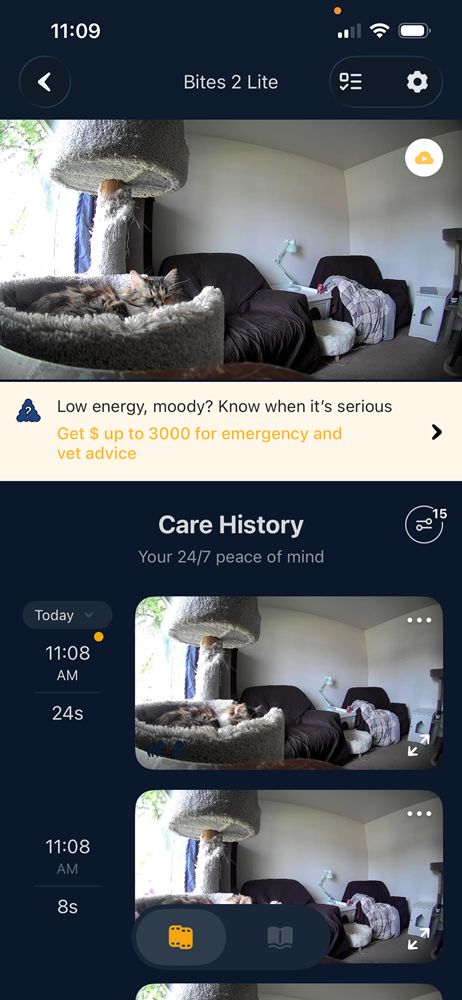
The Petcube Bites 2 Lite is a great option for those who want a wide angle of their room, rather than a camera that tracks movement. It records movements accurately so you won’t miss a thing, and has quality footage even in low light. However, I did have issues with the camera frequently blurring or cutting out partway into the recording (and also in the livestream itself).

Katelynn Sobus / Cats.com

Katelynn Sobus / Cats.com
Katelynn Sobus / Cats.com
As with most pet cameras, you only get these recordings with a subscription plan. Otherwise, you can view your cat live, use the two-way talk feature, and dispense treats.
If you do pay for the subscription, you can also get “daily diaries,” with 30 second videos and AI summaries of your cat’s day. These summaries are somewhat accurate, though I did notice several mix-ups, such as the technology mistaking grooming for drinking water, or walking beneath furniture for stepping into a litter box.
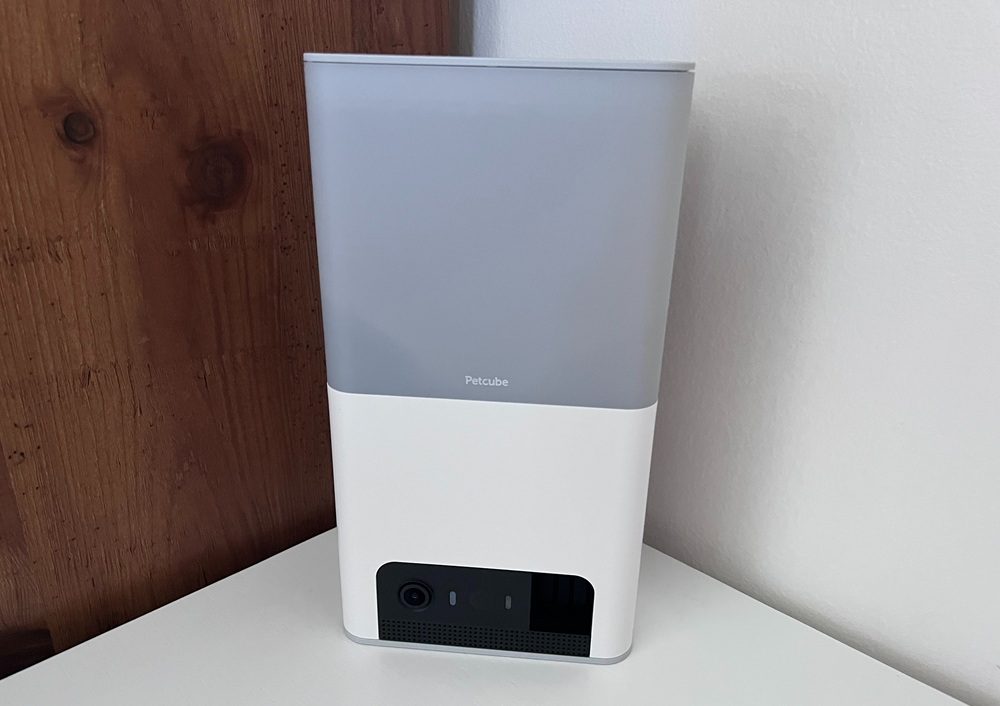
The base of the camera is long and skinny, so it can be difficult to adjust its angle. Its best placement is centered on the area you’d like to record so that it can be placed facing straight ahead, but I also found success setting it at an angle on larger surfaces such as a dresser.
The treat dispenser was a hit with my cats, tossing a small scatter of treats at adjustable distances to provide fun and enrichment while I was away. Katelynn Sobus / Cats.com
One of the main features of this camera is the treat dispensing, which of course my cats loved. My family also had fun taking turns “throwing” the treats, which works by swiping your finger in the app. You can choose how far the treats go, with the furthest hitting the opposite wall of my living room! The treat dispenser provides a small scatter of treats, which is great for providing mental enrichment while you’re away from home.
While I enjoyed testing this camera, there were a couple of things I didn’t like about it. The first is that the treat storage is not very secure, so if your cat knocks the camera down, the lid may pop open and spill treats everywhere. Though most of my cats didn’t mess with the camera at all, my cat Pepper figured this out pretty quickly. Whether it becomes a problem for you will depend heavily on your cat and their personality, but it’s something to look out for.
The app also advertises their emergency pet insurance pretty prevalently, with no way that I could find to remove the ads.
That said, I still liked this camera overall and would recommend it so long as you can place it somewhere out of reach, or you don’t mind having to DIY a lock for the treat storage container! I ended up taping mine shut.
What We Liked:
- 1080p HD video with a wide angle lens
- Frequent recordings (only accessible with subscription service)
- Works with multiple sizes of treats and has a large treat hopper
- Two-way audio
What We Didn’t Like:
- Treat storage is not secure, so cats may spill them by knocking down the camera
- Livestream and recording quality varies, often going blurry or cutting out entirely
- Camera doesn’t pan or tilt, so it can be more difficult to get the right angle
- App features several non-removable ads for the company’s pet insurance
- Added charge for emergency alerts, which can only be accessed with the most expensive subscription tier
#8 Best Automatic Feeder with Pet Camera: PETKIT Yumshare Solo With Camera
The PETKIT Yumshare Solo is a smart feeder with a built-in camera that allows you to watch your cat eat, as well as see how much food is left in their dish. This brought me peace of mind when I tested it with my senior cat, who had a plethora of health problems and sometimes rejected his prescription diet.

Katelynn Sobus / Cats.com

Katelynn Sobus / Cats.com

Katelynn Sobus / Cats.com

Katelynn Sobus / Cats.com
Although you can see your cats when they walk near the food dish, this one isn’t the best choice for cat parents who want to observe their cats all throughout the day. However, if you just want to monitor mealtimes, it does its job well.
The easy set-up process involves choosing your cat’s mealtimes and how much they’ll get for each meal, starting at 1/10 of a cup. You can also feed your cat manually by pressing a button in the app.
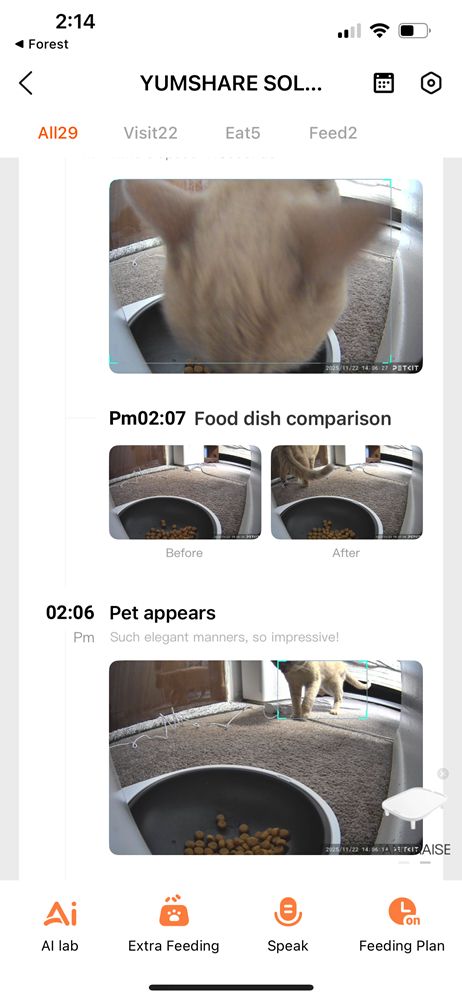
Setup is simple—just schedule mealtimes, choose portion sizes, or dispense food manually through the app. Katelynn Sobus / Cats.com
PETKIT’s subscription service offers a log of daily feedings and how many times your cat visits their bowl, as well as longer recordings of your cat near or at the dish. Without a subscription, you can still watch your cat live at any time and view 30-second clips of your cat near the feeder. However, these clips disappear if you don’t save them that same day.
What We Liked:
- Automatic feeders help keep mealtimes consistent and prevent begging, since you aren’t feeding your cat directly
- Watching your cat eat their meals brings peace of mind, especially if you’re out of town or have a sick cat who struggles to eat
- Easy phone app set-up includes an automatic feeding schedule, the choice for manual feedings, and customizable settings options
What We Didn’t Like:
- Doesn’t work with wet food
- Only records your cat at mealtimes or if they’re near the food bowl
- Some features are locked behind a subscription service
- Camera sometimes begins recording before your cat starts eating, so the 30-second clips may miss the actual meal
How to Choose the Best Pet Camera?
Here are a few things to look for when choosing a pet camera for your cat:
Quality Footage and Nighttime Recording
Of course, the first thing you want to look for in your pet camera is video quality, since some are grainier than others. If you want to check in at night, make sure that the camera has quality nighttime recording as well.
If you’re going to use the camera to listen or talk to your cat, then you’ll also want to look into the audio and microphone quality.
Pet Detection
In my experience, most cameras are better at tracking humans than pets. I assume this is both because we’re bigger and noisier, and because many of the cameras I tested weren’t made for cats specifically.
Depending on what you’re using the camera for, you may want to ensure you get timely notifications when your cat is sighted, or that you purchase a panning camera with good pet tracking features.
You can often turn human tracking on or off and adjust its sensitivity according to your preferences – whether you’d rather not get a notification every time someone walks into the room or you’d prefer to be notified instantly.
Cat-Friendly Features
You may have noticed that not every camera on this list is specifically made for cats. This is because you can often get more features and better quality in a regular security camera, so long as you aren’t looking for cat-specific features such as treat dispensers, feathers, and laser pointers.
In my experience during testing, cameras with these extra features often have lower video quality as well. That said, it’s up to you whether or not this trade-off is worthwhile!
Subscription Fees
Lastly, you’ll want to make sure you know what features are locked behind monthly subscriptions and how much your camera’s subscription service costs.
Unfortunately, most pet cameras these days have subscription services, which may cover things like automatic recordings, cloud storage, pet and human recognition, and other AI technology.
It’s important to know what you’re getting into before buying, and to ensure that you can afford the ongoing subscription fees should you choose to subscribe to unlock specific features.
I was using the HeimVision battery powered camera for indoor and outdoor which you could hear and talk to the cats outside and the footage stayed on my android cell for almost a year without any subscription however after I had to factory reset my phone I couldn’t get the phone connected to the HeimVision app that I had originally on the phone. Their support doesn’t have a phone number and they aren’t answering my emails. I googled for options and they gave some other apps to try but none worked. Any suggestions?
Do you know any camera that allows my cat to see me? He is sick and poorly eating, worse when I am away. It might help him to see me and hear me.
Seems like the Petcube Bites 2 Lite but best to reach out to them directly just to make sure
Is the ”eufy Security S220 Indoor Cam, 2K” okay instead of the ”Eufy Security Solo IndoorCam P24” as it looks like the ”Eufy Security Solo IndoorCam P24” is not available in Canada where I am.
They’re the same product! Go for it!
And one more questions. How about Reolink Security Camera Indoor?
It has higher resolution and can be purchased in a set of two for a good price £67
https://www.amazon.co.uk/Reolink-Security-Camera-Indoor-2-4GHz/dp/B07YDNR754/ref=sr_1_23_sspa?crid=H622U3ZJC63D&keywords=eufy+2k+home+security+three+camera+set&qid=1686532060&sprefix=eufy+2k+home+security+three+camera+set%2Caps%2C173&sr=8-23-spons&sp_csd=d2lkZ2V0TmFtZT1zcF9tdGY&psc=1
I hadn’t researched it (seems like a UK-focused product), but it looks like a great option! I like that it has local storage and a free 7-day cloud storage option.
It seem to be great brand and it offers better sound quality, bit narrower view-field and full-duplex communication (you can talk simultaneously with your cats), EUFY allows only halfduplex connection meaning only one can talk, and when you talk you push button.
Great. I was looking for a camera with good resolution and EUFY camera you rated top sounds best!
Can I establish a connection from a remote location from my smartphone to the camera to speak with cats when not home, or it can only record actions when cats are in the camera range???
You can talk to your cats from anywhere. Your phone communicates with the camera just like another phone or device, so it’s a bit like video calling your cat on Skype or any other platform. As long as you have internet connection for both devices, and you can connect from anywhere on Earth.